Featured Categories
-
SiteLink General Discussions
Software Operations
-
How-To's
Answers to common how-to questions about SiteLink.
-
What's New
Learn about recent updates to SiteLink
An adjustment needs to be made on our pre-lien/lien letters

dperry
Registered User ✭✭✭
Hi,
When we have a pre-lien or lien letter that we need to print out (in this case for a tenant with 2 units) the letter only prints one unit # at the top but gives the total $ in the body is for the total of both units.
We need to fix it so it shows BOTH unit #'s at the top and perhaps the breakdown for each unit in the body.
Thank you for your help or directing me to the right person who can do that for us.
D. Perry
Templeton Mini Storage
When we have a pre-lien or lien letter that we need to print out (in this case for a tenant with 2 units) the letter only prints one unit # at the top but gives the total $ in the body is for the total of both units.
We need to fix it so it shows BOTH unit #'s at the top and perhaps the breakdown for each unit in the body.
Thank you for your help or directing me to the right person who can do that for us.
D. Perry
Templeton Mini Storage
0
Answers
-
 MamaDuke7 Registered User, Daily Operations Certified, Advanced Operations Certified, Administrator Certified, myHub Certified ✭✭✭✭✭Usually, each unit is its own contract. Therefore, each one needs its own pre-lien letter and lien letter with info for just that unit.
I have customers with 3 or 4 spaces, and when the lien process starts, there are letters that print for each unit. And each letter gets its own envelope in the mail. It's very precise to follow the law.1 -
MamaDuke7, I understand that however in this case it has always (for years) printed incorrectly (listing the 1 unit at the top but giving the dollar total on the bottom that combines both units). So what I have done is handwrite the 2nd unit number notating the amount is for the both units.
And yes, each unit has its own contract and always has.
We'd like to get this corrected so that it prints out correctly. Who do I contact? Thank you.0 -
do you have the keyword as Tenant.BalanceCurrent? or Tenant.BalanceAccount. The "Account" one is for all units, the "current" one is for the one unit.0
-
No, we don't have that AnitaJohnston1269. Ours is titled California Preliminary Lien or California Lien Notice.0
-
Go to set up, > Form Set Up>find your Lien form and highlight it> on the right of screen click edit>it will make you choose HTML or RTF, pick the format listed in the format column> check to see if your "keyword" is correct. If not, delete "account" and replace with "current". I have attached photos for examples.
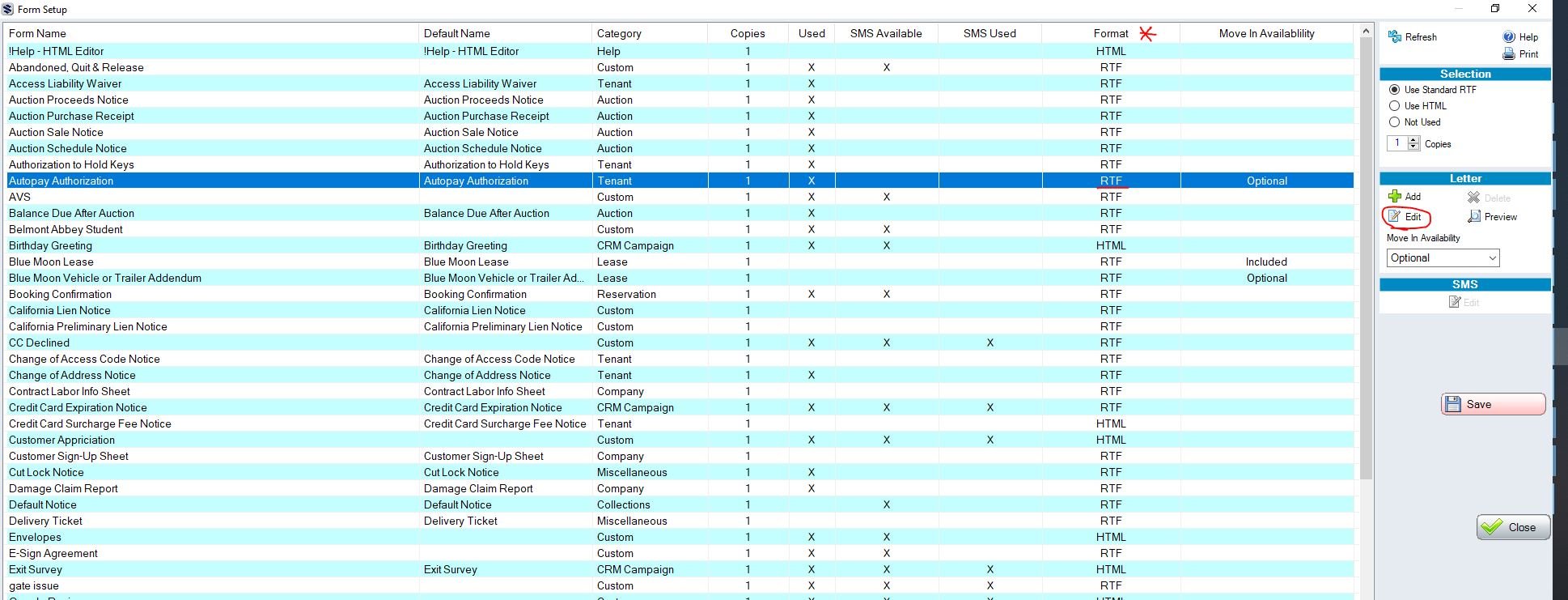
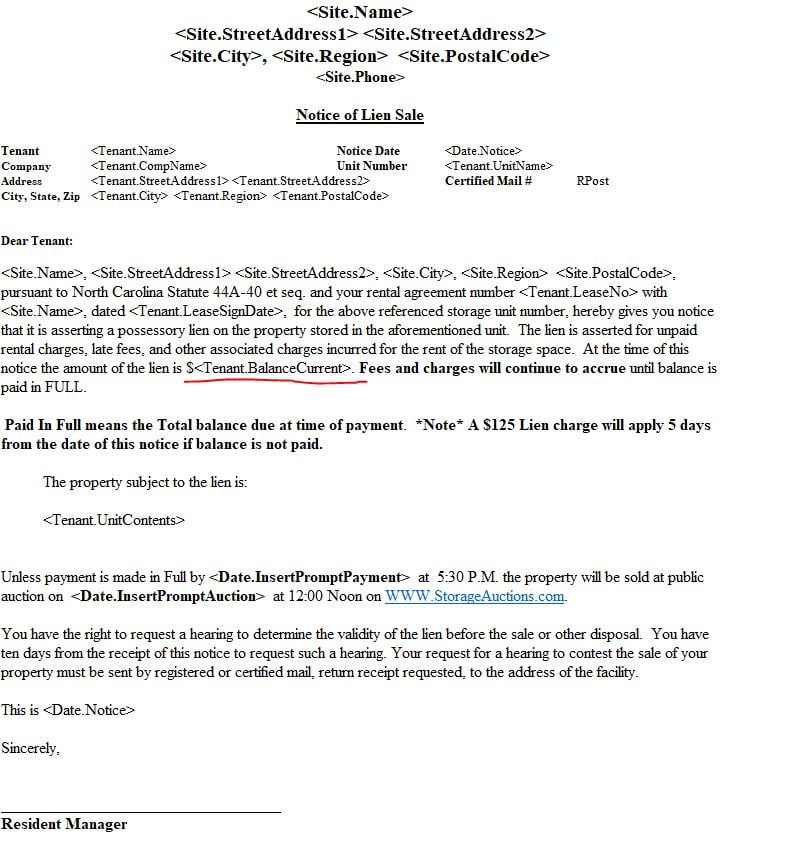 0
0 -
MamaDuke7 Registered User, Daily Operations Certified, Advanced Operations Certified, Administrator Certified, myHub Certified ✭✭✭✭✭For your California PL form, the body should read exactly like this. If any other fields are on there instead of these, that's where your problem lies.Dear Tenant or Alternate:The tenant of <Tenant.UnitName> has not paid rent and/or other charges for the use of unit <Tenant.UnitName> at <Site.Name>, <Site.StreetAddress1> <Site.StreetAddress2>, <Site.City>, <Site.Region> <Site.PostalCode>. These charges total <Tenant.BalanceCurrent> and some of the charges have been due for more than 14 days. They are itemized as follows:Date Description Charge Tax Payment Balance<Tenant.ChargesTable>Total Due <Tenant.BalanceCurrent>If this sum is not paid in full before 5:00 P.M. <Date.InsertPrompt> the tenant's right to use the storage space will terminate, the tenant will be denied access, and an owner's lien on any stored property will be imposed.0
-
I send the past due letter with the lien letter so that it lists both units & balances/reasons.0
-
BusyProperties, I've done that as well every month, this particular tenant does this each month. But it still should not need to be done at all, the pre-lien or lien letters should list that information in and of themselves.1
-
I agree with you, it would be helpful!dperry said:BusyProperties, I've done that as well every month, this particular tenant does this each month. But it still should not need to be done at all, the pre-lien or lien letters should list that information in and of themselves.0


Categories
- All Categories
- 2 What's New
- SiteLink Community Discussions
- 2.1K SiteLink General Discussions
- 82 SiteLink myHub
- 50 Lead to Lease
- 16 Price Optimization
- 37 SiteLink Certified Professional
- 316 How-To's
- 97 Training Videos
- 7 Other Resources
- 210 SiteLink, SpareFoot & storEDGE merge
- Self-Storage Operations
- 67 Starting Out in Self-Storage
- 3 3rd Party Management
- 235 Regional Discussions
- 194 Miscellaneous Discussions
- 40 Industry Webinars
- SiteLink Marketplace
- 65 Self-Storage Website Design & Listing Services
- 34 Credit Cards & Payment Processing
- 33 Self-Storage Call Centers & Kiosks
- 46 Notifications, SMS & Phone Integrations
- 66 Self-Storage Insurance, Legal & Auctions
- 11 Self-Storage Revenue Management & Analytics
- 26 Gates & Access for Self-Storage Facilities
- 10 Ancillary Services for Self-Storage Facilites
- Self-Storage Times
- 59 News
- 30 Opinion
- 146 Lifestyle