Featured Categories
-
SiteLink General Discussions
Software Operations
-
How-To's
Answers to common how-to questions about SiteLink.
-
What's New
Learn about recent updates to SiteLink
When several units are rented same day by same person

dperry
Registered User ✭✭✭
When a new tenant is moving into several units is there a way to do the move in for the combined units or does it have to be individually? Same size units and same price...
0
Best Answer
-
 MamaDuke7 Registered User, Daily Operations Certified, Advanced Operations Certified, Administrator Certified, myHub Certified ✭✭✭✭✭Each has to be done individually.0
Answers
-
Well darn, I was trying to save time for the new tenant. Thank you for the information.1
-
Each unit has to be treated separately in case the customer moves out of one before the others. Be sure autopay is also signed separately.1
-
Once all units are moved in, you can then link them together in Sitelink, which is nice. Just let me know if you need to know how to do this. Karen
 0
0 -
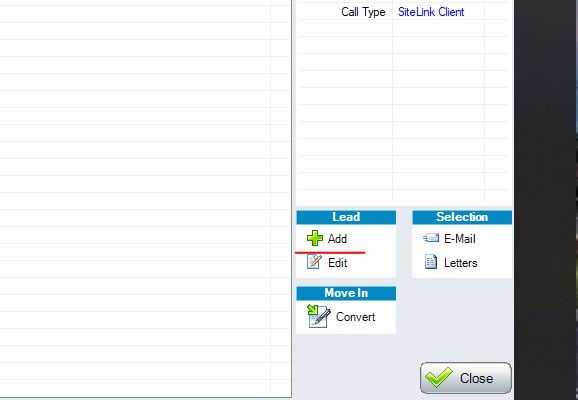
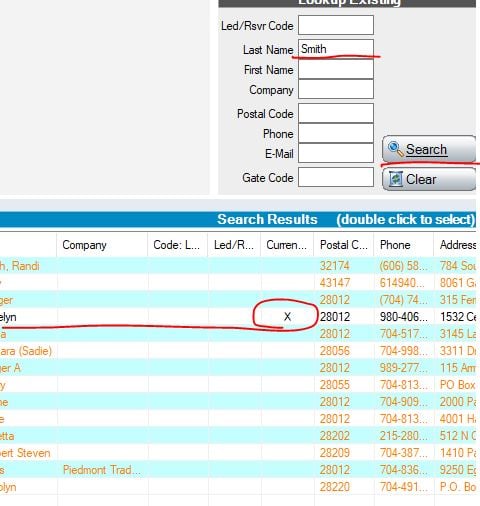
@dperry @StoreyReeceK Once you move in and complete the 1st unit, go back to Lead to Lease, click ADD and do a search for the tenant last name, double click on the current tenant (there will be x) and it will "link" the units and fill in all the customer information. You would then just need to select the unit and move them in. The only information it will not pull would be the credit card number.
 0
0 -
Thank you!0


Categories
- All Categories
- 2 What's New
- SiteLink Community Discussions
- 2.1K SiteLink General Discussions
- 82 SiteLink myHub
- 50 Lead to Lease
- 16 Price Optimization
- 37 SiteLink Certified Professional
- 234 How-To's
- 97 Training Videos
- 7 Other Resources
- 128 SiteLink, SpareFoot & storEDGE merge
- Self-Storage Operations
- 66 Starting Out in Self-Storage
- 3 3rd Party Management
- 234 Regional Discussions
- 194 Miscellaneous Discussions
- 40 Industry Webinars
- SiteLink Marketplace
- 65 Self-Storage Website Design & Listing Services
- 34 Credit Cards & Payment Processing
- 33 Self-Storage Call Centers & Kiosks
- 46 Notifications, SMS & Phone Integrations
- 66 Self-Storage Insurance, Legal & Auctions
- 11 Self-Storage Revenue Management & Analytics
- 26 Gates & Access for Self-Storage Facilities
- 10 Ancillary Services for Self-Storage Facilites
- Self-Storage Times
- 59 News
- 30 Opinion
- 146 Lifestyle