Featured Categories
-
SiteLink General Discussions
Software Operations
-
How-To's
Answers to common how-to questions about SiteLink.
-
What's New
Learn about recent updates to SiteLink
Is there a new way to complete a 6 month or 1 year payment?

dperry
Registered User ✭✭✭
Hello!
Last week, on Saturday, a tenant called to say she wanted to pay a years worth of rent.
However, when I tried processing it, it would not let me do that, plus, it told me I needed more money which I know for a fact, was incorrect.
This is not the first time a tenant wants to pay in advance- yes, it's been a long while. (We finally had to do it a different day because I wanted someone else in the office (on Monday) to look to see if I was missing something. We finally set it up as if this was a new tenant and the payment run that way, so we lost the tenant's original history.
I sent the issue to sitelink support last Saturday, I am still waiting to hear back.
Please send me the instructions so we know what happened. We certainly do NOT want this to happen again.
Thank you.
Last week, on Saturday, a tenant called to say she wanted to pay a years worth of rent.
However, when I tried processing it, it would not let me do that, plus, it told me I needed more money which I know for a fact, was incorrect.
This is not the first time a tenant wants to pay in advance- yes, it's been a long while. (We finally had to do it a different day because I wanted someone else in the office (on Monday) to look to see if I was missing something. We finally set it up as if this was a new tenant and the payment run that way, so we lost the tenant's original history.
I sent the issue to sitelink support last Saturday, I am still waiting to hear back.
Please send me the instructions so we know what happened. We certainly do NOT want this to happen again.
Thank you.
0
Answers
-
When you go in to take a payment, you will change the periods from 1 to __ then check the box Make Future Charges. If you need to discount anything you can click on Edit Charges & Payments THEN just be sure to click OK to save it.2
-
Also *Note that if there is a rate increase pre-scheduled, the system will adjust the rate accordingly. i.e. If paying 6 months and rate changes +$10 after 3 months, the last 3 months will be $10 more.BusyProperties said:When you go in to take a payment, you will change the periods from 1 to __ then check the box Make Future Charges. If you need to discount anything you can click on Edit Charges & Payments THEN just be sure to click OK to save it.0 -
That didn't work, it only gives a discount up to 6 months0
-
 MamaDuke7 Registered User, Daily Operations Certified, Advanced Operations Certified, Administrator Certified, myHub Certified ✭✭✭✭✭
That would be how the discount is set up. It's probably set to 6 months. You'd need to create a new discount and set this field to 12 months.dperry said:That didn't work, it only gives a discount up to 6 months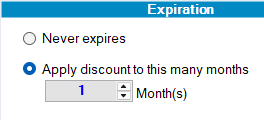 1
1 -
So that is the weird thing, it used to be set up for a 6 month or a 12 month discount. Now it doesn't show a 12 month at all.1
-
MamaDuke7 Registered User, Daily Operations Certified, Advanced Operations Certified, Administrator Certified, myHub Certified ✭✭✭✭✭
Cool. Just create a new one exactly how you want it! At least you found the problem and can fix it for the future.dperry said:So that is the weird thing, it used to be set up for a 6 month or a 12 month discount. Now it doesn't show a 12 month at all.1 -
This may be related to how SiteLink handles advance rent payments or how the tenant's account balance is calculated. I would first check the payment schedule, outstanding charges, and any limits on advance payments before processing it again. Since setting it up as a new tenant removed the original history, I would avoid that workaround and ask support to confirm the correct procedure. It would also help to review the transaction logs to identify why the system requested extra funds.
Software Engineer | Product Manager | Tech Enthusiast
0



Categories
- All Categories
- 2 What's New
- SiteLink Community Discussions
- 2.1K SiteLink General Discussions
- 82 SiteLink myHub
- 50 Lead to Lease
- 16 Price Optimization
- 37 SiteLink Certified Professional
- 318 How-To's
- 97 Training Videos
- 7 Other Resources
- 212 SiteLink, SpareFoot & storEDGE merge
- Self-Storage Operations
- 67 Starting Out in Self-Storage
- 3 3rd Party Management
- 235 Regional Discussions
- 194 Miscellaneous Discussions
- 40 Industry Webinars
- SiteLink Marketplace
- 65 Self-Storage Website Design & Listing Services
- 34 Credit Cards & Payment Processing
- 33 Self-Storage Call Centers & Kiosks
- 46 Notifications, SMS & Phone Integrations
- 66 Self-Storage Insurance, Legal & Auctions
- 11 Self-Storage Revenue Management & Analytics
- 26 Gates & Access for Self-Storage Facilities
- 10 Ancillary Services for Self-Storage Facilites
- Self-Storage Times
- 59 News
- 30 Opinion
- 146 Lifestyle